Automated creator sourcing in UGC Agent turns one plain-English request into a recurring search. Set the criteria, count, schedule, timezone, and recipient. The first run starts immediately, then future runs send a creator preview and CSV. Agent Preferences, excluded creators, and previously delivered results reduce repeats. You can edit or delete the automation without rebuilding the workflow.
Automated creator sourcing fixes a simple operating problem: a creator pipeline stops when someone forgets to run the next search. Campaigns keep consuming new profiles, but one-off discovery depends on an operator returning to the tool, rewriting the request, cleaning duplicates, and sending the result onward.
UGC Agent automations turn that repeated task into a schedule. You describe the creators, cadence, delivery time, timezone, and recipient in plain English. The agent asks for missing details, runs the first batch immediately, and delivers future batches without a separate schedule builder. The feature launched in our August 11, 2026 product update.
What is automated creator sourcing?
Automated creator sourcing runs a defined creator search on a recurring schedule and delivers the results to a chosen destination. It removes the need to remember and rebuild the same search, while leaving profile review, outreach, negotiation, and hiring decisions with the team.
A recurring search starts with the same inputs as a manual one: platform, niche, location, language, follower range when relevant, product or persona fit, content evidence, email requirements, exclusions, result count, and delivery destination.
The automation adds time. You might ask for 20 new US skincare creators with public emails every weekday at 9 a.m., or a weekly list of TikTok creators who make app walkthroughs. The schedule should match the review and outreach capacity, not simply produce the largest possible volume.
Automation changes when the search runs. It does not change what a qualified creator means. A human still needs to review the public evidence and confirm that the profile fits the live campaign.
Why one-off creator searches create a pipeline gap
One-off sourcing tends to happen in bursts. A campaign opens, the team scrambles for profiles, outreach begins, and discovery stops until the shortlist runs low. The next search starts under deadline pressure and often repeats profiles the team already reviewed.
A recurring cadence separates discovery from urgency. New candidates arrive while the current batch is being contacted, so sourcing can feed the next review cycle instead of waiting for a shortage.
The cadence still needs an owner. Someone should review each delivery, reject weak matches, update exclusions, and record which criteria are producing noise. Automation without feedback can produce the same wrong list on time every morning.
How UGC Agent automations work
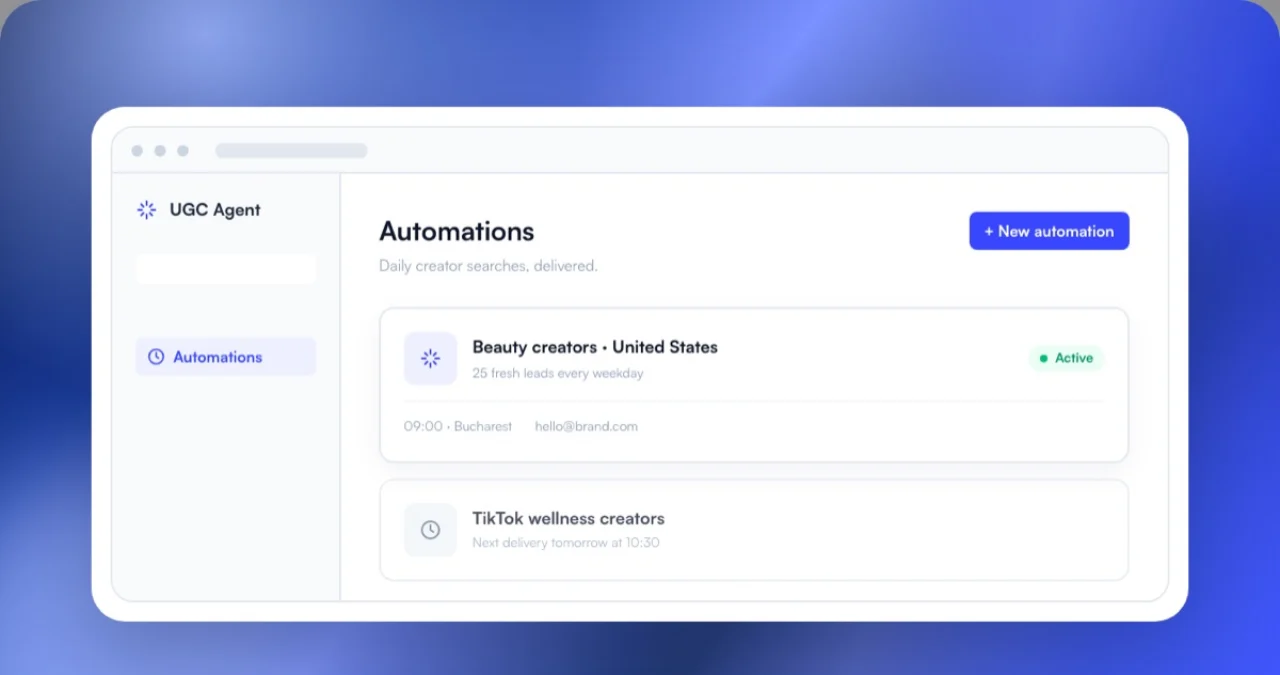
Describe the recurring job in chat. UGC Agent confirms the missing criteria, reads the workspace timezone, runs the first batch immediately, and saves the schedule. Each later run sends a branded preview of the creators plus the complete result as a CSV.
Describe the schedule in plain English
A request can combine search and timing in one sentence: “Every weekday at 9 a.m., find 20 new US skincare creators with public emails and send them to my inbox.” The agent asks follow-up questions only when a required input is missing.
Review the first batch immediately
The first run starts when the automation is created. That gives you a concrete result before the schedule becomes routine. If the batch is too broad, too narrow, or missing a must-have signal, change the criteria before several weak deliveries accumulate.
Receive a preview and working file
Each run sends a branded preview and attaches the full list as a CSV. The preview supports a quick scan. The file supports the operational handoff into review, saved leads, or outreach.
How recurring searches avoid repeat creators
UGC Agent applies the workspace's Agent Preferences, Excluded Creators list, and the creators previously delivered by that automation. Those controls reduce repeated profiles and keep each scheduled batch focused on new candidates.
Deduplication matters because repeat profiles consume review time and can create duplicate outreach. The system uses the history it already has, but operators should still maintain one source of truth for contacted, declined, blocked, and contracted creators.
Agent Preferences
Preferences carry recurring requirements into the search, such as regions, platforms, creator types, or evidence standards. Review them when the campaign changes instead of assuming old preferences fit every new product.
Excluded Creators
Exclusions prevent known mismatches from returning. Use specific reasons when possible, such as wrong region, no recent product demonstrations, conflicting category, or do-not-contact status.
If you already have a list from another source, upload it to UGC Agent to exclude existing partners or seed a find-more-like-these search before the data joins the rest of the workflow.
What you can change after the automation starts
You can update the criteria, result count, schedule, delivery time, or recipient from the Automations view or through chat. You can also delete an automation when the campaign closes or the search no longer has an owner.
Change one meaningful variable at a time when diagnosing result quality. If you replace the niche, region, platform, and follower range together, you will not know which change improved or weakened the next batch.
Keep a short note beside the automation explaining the campaign, reviewer, outreach destination, and current status. A scheduled list is most useful when another operator can understand why it exists and what happens after delivery.
What still needs human review
A recurring search does not hire creators. Review identity, recent work, product fit, language, location, contact ownership, safety, availability, compensation, usage rights, and campaign-specific constraints before outreach or contracting.
Use the UGC creator screening checklist for a consistent review pass and the public creator-fit methodology to understand which profile signals support the first-pass score.
Do not let delivery volume dictate outreach volume. Contact only the creators your team has reviewed and can respond to. A smaller, current queue is easier to manage than a large backlog with unclear status.
For the broader discovery workflow, the guide to finding UGC creators explains how recurring software, manual social search, applications, marketplaces, and referrals can work together.
How to set a useful automated sourcing cadence
Match the schedule to the team's capacity to review and contact creators. A useful automation keeps the qualified queue replenished. An oversized automation creates a backlog, stale evidence, and duplicate work even when every run finishes on time.
Work backward from the number of profiles one reviewer can inspect properly. If the team can review twenty creators each weekday, a daily delivery of one hundred will create an eighty-profile backlog on day one. By the end of the week, the newest evidence is buried under records nobody has opened.
Separate discovery cadence from outreach cadence. New creator records can arrive every day while outreach launches twice a week after review. This gives the team time to remove weak matches, verify the contact route, assign the right campaign, and avoid sending several messages to the same person.
Use smaller batches for narrow briefs. A city-specific medical service, a parent creator with children in a defined age range, or a creator who can demonstrate one technical product may not produce a large fresh list every morning. Weekly delivery can preserve quality and reduce repeated searches.
Set an expiration rule for unreviewed records. Public evidence and availability change. If a delivery remains untouched for several weeks, refresh the profile before outreach instead of assuming the original screen is still current.
Review the automation itself on a schedule. Check pass rate, common rejection reasons, repeats, missing contacts, and the share that reaches outreach. If most profiles fail for the same reason, update the criteria. If the queue is always empty, increase the count or cadence only after confirming that review capacity exists.
Pause recurring sourcing when the campaign closes, the product is out of stock, the owner is unavailable, or outreach cannot absorb more leads. A reliable automation should make stopping as clear as starting. The metric that matters is not how many runs completed. It is how many current, relevant profiles entered a process the team could actually finish.
Conclusion
Automated creator sourcing is useful when the campaign needs a steady review queue, not another one-time spreadsheet. Define the creator precisely, start with a cadence your team can process, inspect the first batch, and feed review decisions back into preferences and exclusions. Keep the schedule automated and the commercial decisions human. Start free and describe the recurring creator search you want to run.
Frequently asked questions
What is automated creator sourcing?
It is a recurring creator search that runs from saved criteria and delivers new results on a schedule. The team still reviews profiles and owns outreach, negotiation, contracts, and hiring.
Can I write the schedule in plain English?
Yes. A request can include the creator criteria, result count, cadence, time, timezone, and recipient. The agent asks for missing inputs before saving the automation.
When does the first automated search run?
The first batch starts when the automation is created. This lets the user review a real result before relying on the recurring schedule.
How does UGC Agent reduce duplicate creators?
Automations respect Agent Preferences, the Excluded Creators list, and creators previously delivered by the automation. Teams should still keep contacted and do-not-contact statuses in their operating system.
Can an automation be edited or deleted?
Yes. Users can change criteria, count, schedule, time, and recipient, or delete the automation when it is no longer needed.